How to submit requests in Shein’s Free Trial Center
Anúncios
How to submit requests in Shein’s Free Trial Center
A practical sequence based on the public Help Center: open the panel, apply, track status, and complete — or correct — the review.
Independent informational guide — Compiled from publicly available details in Shein’s Free Trial Help Center. This site is not affiliated with the brand. Participation is selective and approval is never guaranteed. Check the official terms of each campaign before applying.
The trial section can look simple. First-time users still often ask where to click, how many requests they can send, and how to tell if they were selected.
The walkthrough below covers the usual path. Selection follows internal criteria and is never automatic.
Why many applications stall
A high volume of entries is processed each week. Incomplete profiles, an address from another country, late applications, or thin reviews without photos are common reasons a request does not move forward.
What the program is
The Free Trial Center is Shein’s official product-evaluation area. Selected accounts may receive items to try and must post an honest review. If approved, a $0 order is typically created and shipping starts automatically.
Listings rotate. No account has guaranteed access. Review history, how quickly you apply, and the quality of earlier reports usually matter for later campaigns.
Categories that often appear
- Fashion: tops, dresses, denim, outerwear, and seasonal pieces.
- Beauty: makeup, skincare, and personal care.
- Accessories: bags, jewelry, footwear, and extras.
- Home: décor, organizers, and everyday household items.
Open the Free Trial Center
Sign in. In the app: Profile → More Services / Other Services → Free Trial Center. On the website, look for Free Trial under account or community tools.
Browse items accepting applications in the current cycle. Inventory changes often.
Anúncios
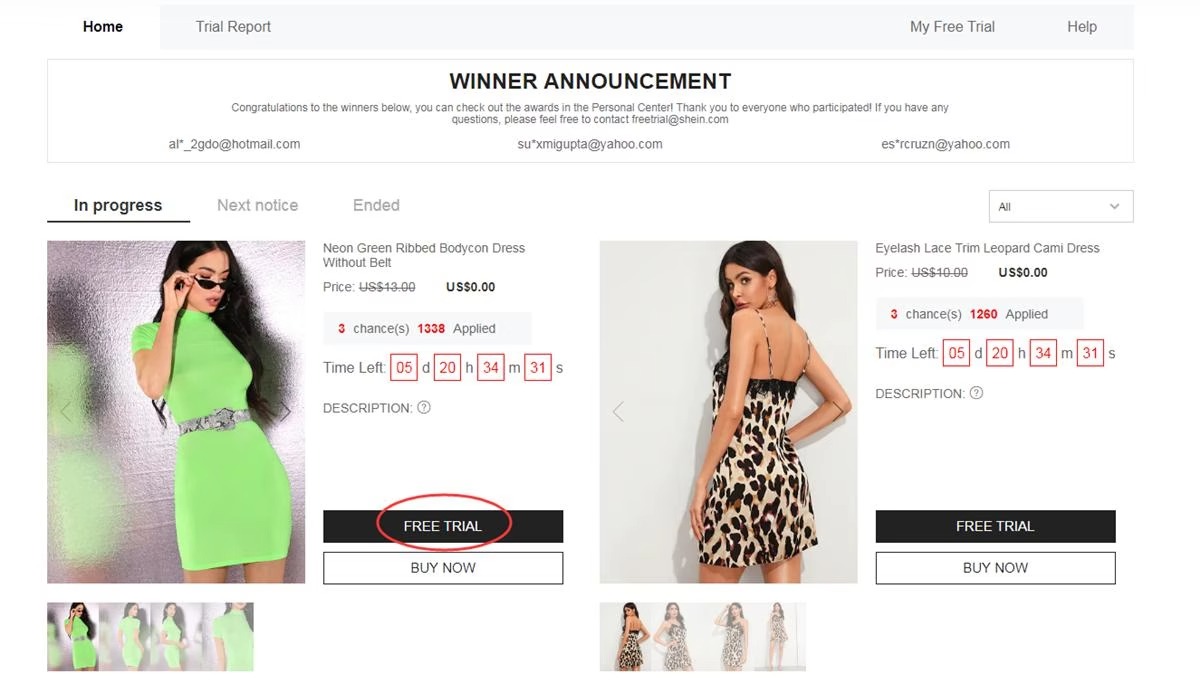
Apply for up to 3 items per week
Program guidelines usually allow 3 applications every seven days. Unused slots do not carry over.
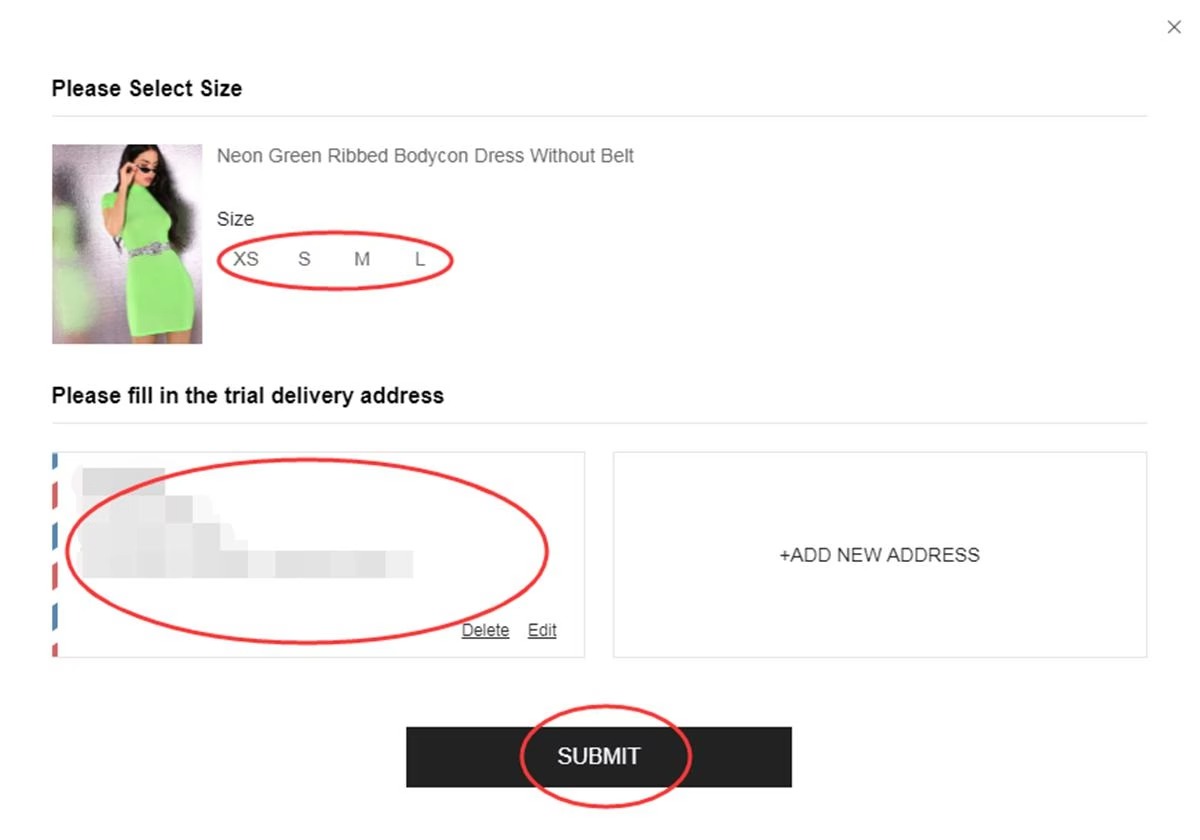
- Open Free Trial on the item
- Choose the correct size when the listing has variations
- Use an address in the same country as the Shein site you are browsing
- Review the details and tap Submit
If the country or address does not match the store region, the request can be invalid immediately.
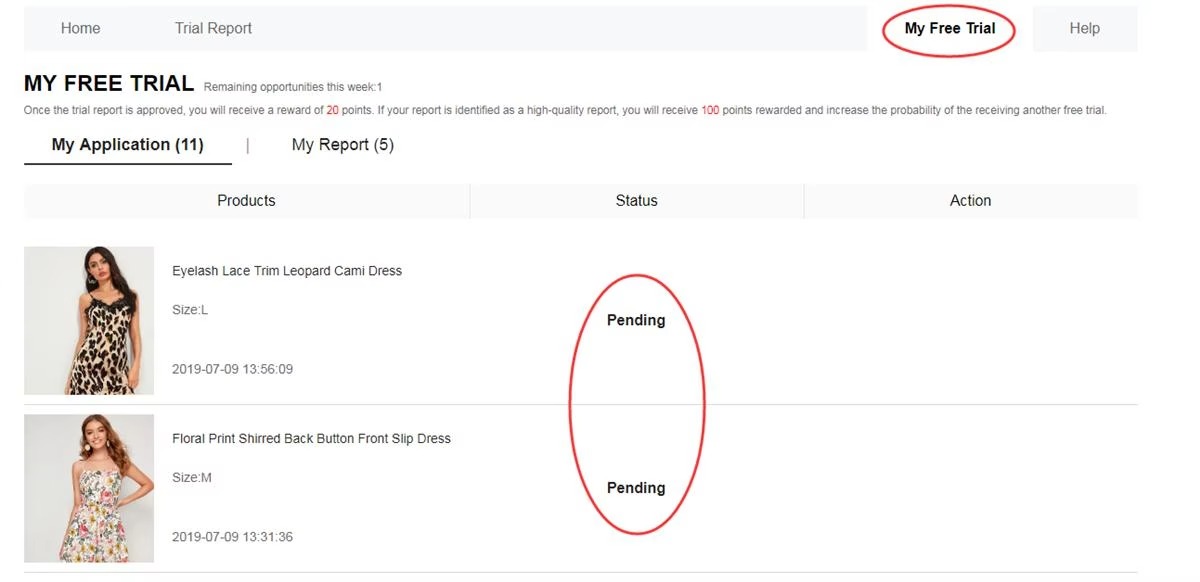
Check application status
Results often appear in about one week under My Free Trial / My Applications.
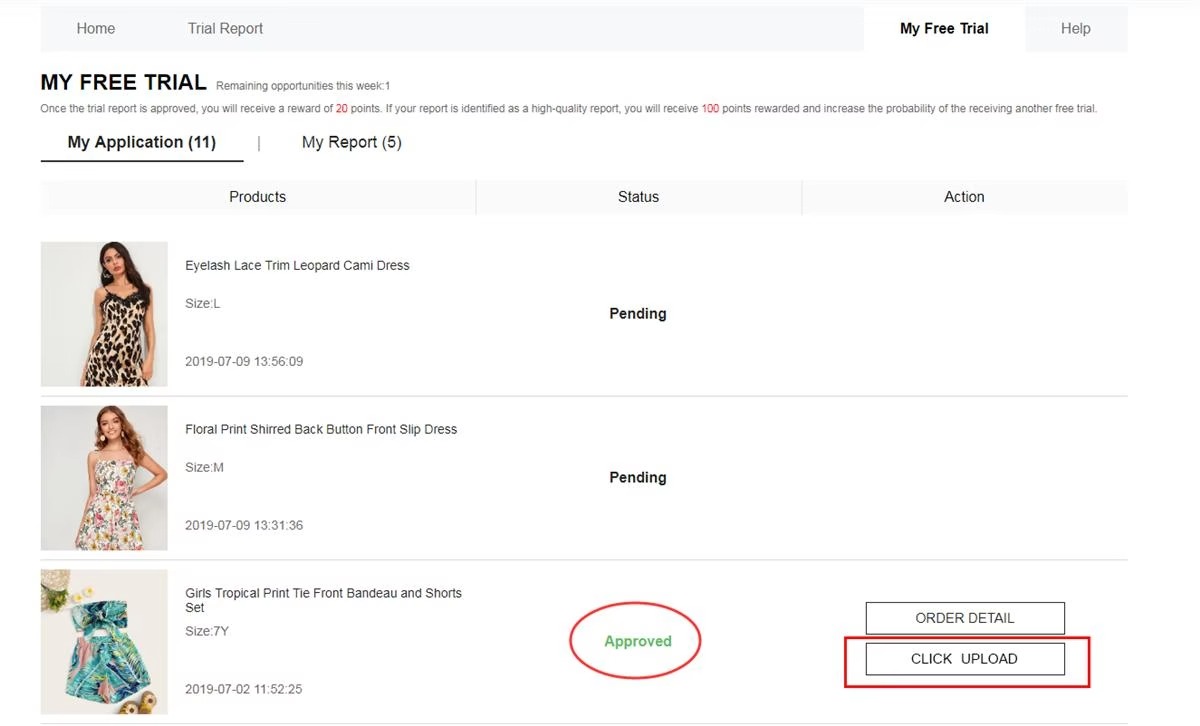
- Approved — the request was selected. A $0 order may be created automatically for shipping.
- Failed — that opportunity was not assigned. Later campaigns can still be tried.
Try the product and submit the review
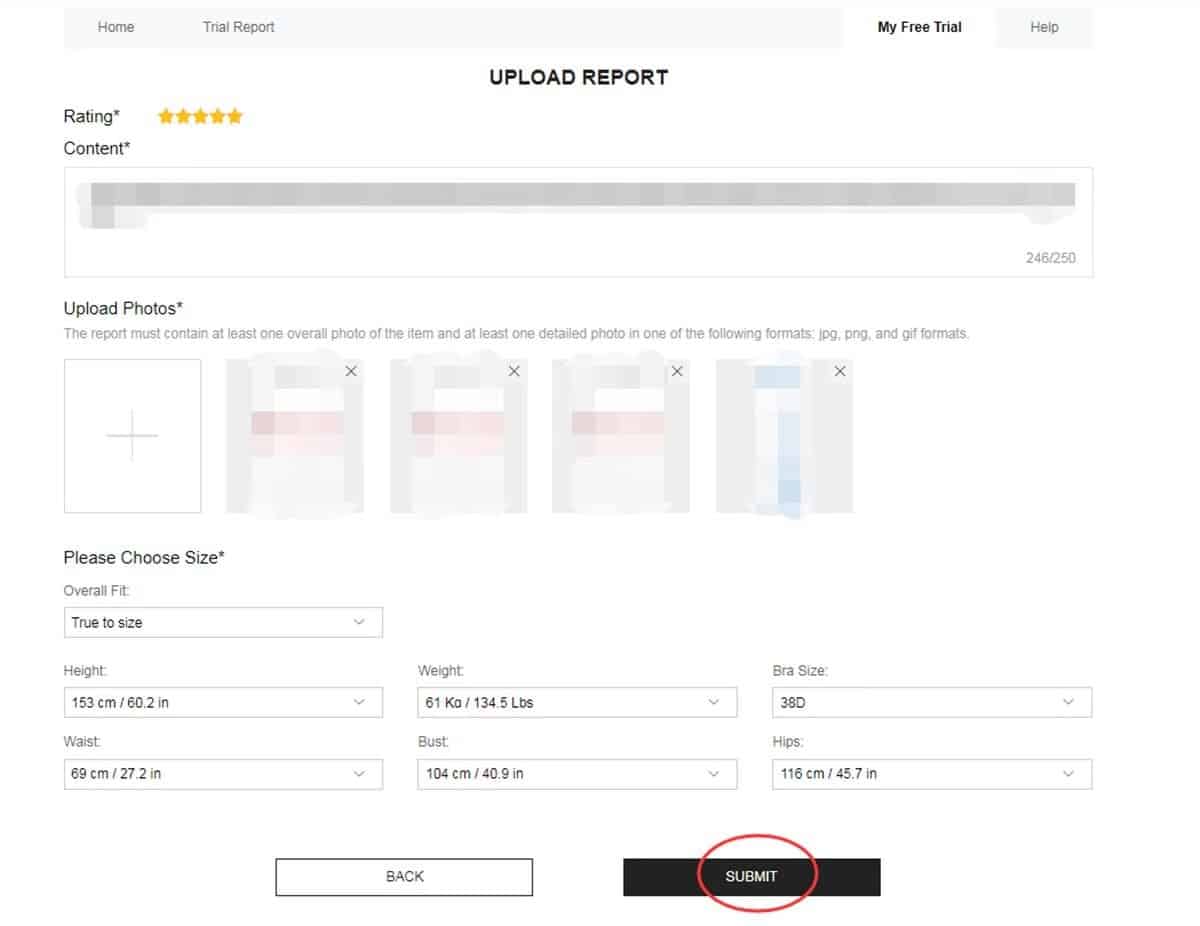
If selected and the item arrives, use it first. Note fit, fabric, construction, comfort, and everyday use. Then send an honest, detailed review from My Report, usually within about 10 days. Clear original photos help — one full-body shot and two detail shots is a common recommendation.
Confirm points after the review is accepted
Open My Report to confirm the submission was accepted. An approved review typically adds about 20 shopping points. If it is tagged as a Quality Report, around 100 extra points may be added under the rules shown in the app. Points reflect history; they do not guarantee later selection.
Rewrite the review if it is rejected
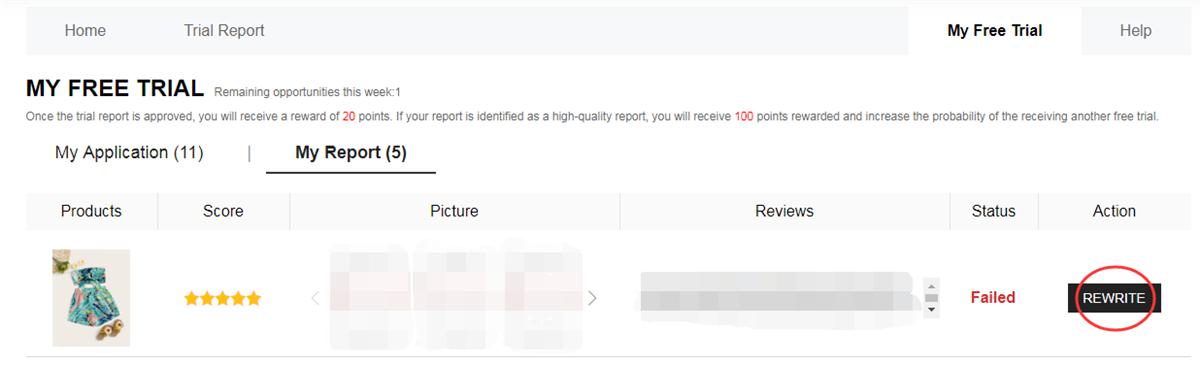
If the post is marked Failed, look for Rewrite in My Report. Expand the text, replace unclear photos, and send it again promptly. Leaving a rejected report unfinished can reduce later chances. One extra attempt is commonly offered.
What a stronger review usually includes
- Pros and cons, not only a short compliment
- Specific notes on fit, fabric, comfort, and finish
- Your own well-lit photos from more than one angle
Details to confirm before applying
- Up to 3 applications per week; unused slots usually expire
- Address country must match the store being accessed
- Standard shipping may be covered; taxes or customs can vary by location
- Aim to finish the report within about 10 days of delivery
- Duplicate or irregular accounts can lose access
- Pending or rejected reviews left unfinished can affect later applications
Mistakes that often block progress
❌ Incomplete account details or the wrong size
❌ An address that does not match the store country
❌ Waiting until popular listings are almost closed
❌ Vague reports with no useful text or real-product photos
❌ Missing the review deadline
❌ Leaving a Failed report without using Rewrite
Frequently asked questions
Is shipping free?
Standard shipping is generally covered. Taxes, duties, or customs fees may still apply under local rules.
Anúncios
What is the weekly limit?
Usually up to 3 applications each week. Unused attempts typically expire instead of accumulating.
Do selected participants keep the product?
In the standard format, yes — after receiving it and submitting the requested review. Always check that campaign’s terms.
How long until the result appears?
About one week. Check My Free Trial for the updated status of each application.
Can a rejected review be sent again?
The platform may offer one extra attempt so the report can be corrected and resubmitted.
Do I need to be an influencer?
No. Following the rules, keeping the account in good order, and writing useful reviews usually matter more than follower count.
In short: open Free Trial Center → apply within the weekly cap → track the result → if selected, try the product → publish the review on time → fix it if rejected.
Want to visit the official Free Trial section?
See which items are live and read the current participation conditions before you apply. Selection is never guaranteed.
This button opens SHEIN’s official Free Trial Center.
Reference: SHEIN Free Trial Help Center